<?xml version="1.0" encoding="UTF-8"?><rss xmlns:dc="http://purl.org/dc/elements/1.1/" xmlns:content="http://purl.org/rss/1.0/modules/content/" xmlns:atom="http://www.w3.org/2005/Atom" version="2.0" xmlns:media="http://search.yahoo.com/mrss/"><channel><title><![CDATA[Tropy]]></title><description><![CDATA[Research photo management]]></description><link>https://tropy.org/blog/</link><generator>Ghost 0.11</generator><lastBuildDate>Wed, 13 Jun 2018 13:47:23 GMT</lastBuildDate><atom:link href="https://tropy.org/blog/rss/" rel="self" type="application/rss+xml"/><ttl>60</ttl><item><title><![CDATA[Tropy 1.2 Release]]></title><description><![CDATA[<p>We are happy to announce the release of Tropy 1.2. This <a href="https://github.com/tropy/tropy/releases/tag/1.2.0">release</a> includes several new features that make it easier to work with custom metadata templates.</p>

<ul>
<li><p><a href="https://docs.tropy.org/using_tropy/templates/create-template.html">Improved template editor</a>: Creating custom templates is now much easier using new search and select features in the template editor. Now you can</p></li></ul>]]></description><link>https://tropy.org/blog/tropy-1-2-release/</link><guid isPermaLink="false">fdd4c138-ac1b-450d-8617-6db27c1ae7ad</guid><category><![CDATA[News]]></category><dc:creator><![CDATA[Abby Mullen]]></dc:creator><pubDate>Wed, 23 May 2018 14:51:47 GMT</pubDate><media:content url="http://tropy.org/blog/content/images/2018/05/maze-1.2.png" medium="image"/><content:encoded><![CDATA[<img src="http://tropy.org/blog/content/images/2018/05/maze-1.2.png" alt="Tropy 1.2 Release"><p>We are happy to announce the release of Tropy 1.2. This <a href="https://github.com/tropy/tropy/releases/tag/1.2.0">release</a> includes several new features that make it easier to work with custom metadata templates.</p>

<ul>
<li><p><a href="https://docs.tropy.org/using_tropy/templates/create-template.html">Improved template editor</a>: Creating custom templates is now much easier using new search and select features in the template editor. Now you can type a search term to find a metadata property rather than needing to scroll through all of your vocabularies.</p></li>
<li><p><a href="https://docs.tropy.org/using_tropy/project_view/view_photos.html">Customizable columns</a>: You can now change which columns you see in the item table, as well as re-order them. </p></li>
<li><p>New plugin UI: Installing plugins is now easier thanks to a newly introduced plugin user interface. You can test it out with the <a href="https://docs.tropy.org/omeka.html">Omeka S plugin</a>, or you can <a href="https://github.com/tropy/tropy/wiki/PluginTutorial">write your own plugin</a>!</p></li>
</ul>

<p>These features all give you better options to customize Tropy to meet your needs. If you already have Tropy installed, it should prompt you to install the update. If you have questions or problems, please <a href="https://docs.tropy.org/">check the documentation</a>. If you can't find what you need there, please <a href="https://forums.tropy.org/">post to our forums</a>.</p>]]></content:encoded></item><item><title><![CDATA[Using Tropy with Newspapers]]></title><description><![CDATA[<p>As I outlined in my last post, my primary Tropy project is mostly composed of handwritten correspondence. I also have side projects that include different types of sources. And I’ve also been getting my sources in a different way.</p>

<p>Tropy doesn’t care where you get your images from.</p>]]></description><link>https://tropy.org/blog/using-tropy-with-newspapers/</link><guid isPermaLink="false">7e92f8d2-7167-4f5b-be6b-c26bddd04e19</guid><category><![CDATA[Research practices]]></category><dc:creator><![CDATA[Abby Mullen]]></dc:creator><pubDate>Thu, 29 Mar 2018 14:00:00 GMT</pubDate><content:encoded><![CDATA[<p>As I outlined in my last post, my primary Tropy project is mostly composed of handwritten correspondence. I also have side projects that include different types of sources. And I’ve also been getting my sources in a different way.</p>

<p>Tropy doesn’t care where you get your images from. In addition to taking photos in an archive, many of us use images we download from the Internet. Many archives have digitized and made available some or all of their collections. These digitized images are research images just like ones we take ourselves. </p>

<p>Keeping track of digital images downloaded from the Internet can be more difficult than keeping track of photos we take ourselves. It’s doubly important to record immediately the metadata for those images, because an image lost to the entire Web is much harder to recover than an image lost simply to your hard drive and memory of the archival visit.</p>

<p>The best way to illustrate this point is to demonstrate my process for working with some of these downloaded images. </p>

<h3>Make a Custom Template</h3>  

<p>For my most recent side project, I’ve been focusing on newspapers from Chronicling America. Knowing that I was going to be using newspapers, I wanted to harvest as much consistent metadata from those papers as possible. So I created a custom template for newspapers. </p>

<figure><img src="https://tropy.org/blog/content/images/2018/03/newspaper-template.png" data-rjs="2"><figcaption>My custom newspaper template</figcaption></figure>

<p>My template breaks down into three basic groups of information: article information, paper information, and archive information. The first three fields deal with the article itself--the title of the article, its author (if listed), and the attribution (where it was reprinted from, if listed). </p>

<p>The second group relates to the paper--the date of publication, the paper title, and its location. I’ve also included here an identifier, which for me is a number that identifies the paper, not the article.</p>

<p>The third group relates to the place I found the paper. The archive and collection denote the holder of the digital image (this is important for papers in Chronicling America in particular--the physical copies of the digitized papers reside in various state institutions, so when I fill in “Library of Congress,” I’m indicating the location of the digital image, not the physical newspaper). I’ve put the rights information here as well. Finally, I include a URL. This URL links to the smallest digitized unit I can get. In Chronicling America, the URL points to a specific newspaper page. In other newspaper repositories such as America’s Historical Newspapers, it could be a URL to a specific article.</p>

<h3>Download Images</h3>  

<p>Once I had my template ready to go, I began to search for newspaper articles. Once I found one, I downloaded the image of the page I wanted. Chronicling America images download as JPEG 2000, which isn’t a format Tropy currently supports. However, converting to JPG is a quick and easy process (on a Mac, open your image in Preview and export as JPG). </p>

<p>Without closing the webpage of the newspaper page, I did the conversion and pulled the image into Tropy. </p>

<h3>Add Metadata</h3>  

<p>Once I had my image in Tropy, I returned to the Chronicling America page to find the metadata. (Real talk: It is pretty helpful to have two monitors here so you don’t have to keep switching back and forth between Tropy and your web browser.) </p>

<p>Putting in the metadata is straightforward. Copying and pasting straight from the webpage eliminates spelling mistakes, or you can take a little risk and do the typing yourself. (I alternate between these two options.) </p>

<h3>Reading and Using the Article</h3>  

<p>As I’ve worked with Chronicling America images for Tropy, I’ve learned a few things about usability. Newspapers are very dense and have very small type, which makes them hard to read. I tested a few different ways to give my eyes a break as I worked with the images in Tropy.</p>

<p>Chronicling America allows you to “clip” a portion of the page, just like an editor with scissors. At first I thought this technique would help me keep the image size manageable. However, the clip function is inexact at best. And I discovered that the clipped image is fairly low-resolution, unlike the JPEG 2000 image of the whole page. </p>

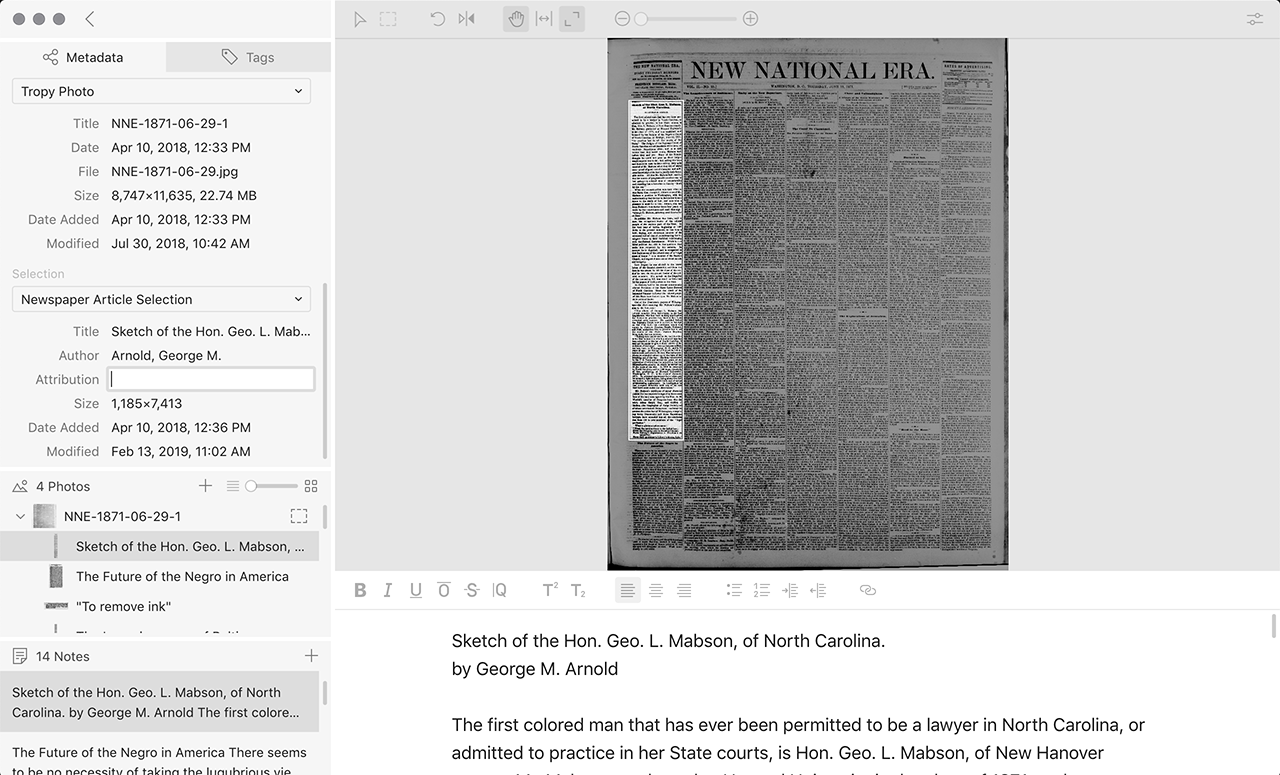
<p>Tropy provides a different solution to this problem. Its tools allow me to get the benefit of having the high-resolution image of the whole page with the legibility of a smaller section. In the item view, you can create a selection to demarcate a specific area of your photo. You can then zoom directly to that area, change that area’s title, and add notes specifically related to that area. You can have multiple selections per image, so if you’re interested in more than one article on the page, or your article spans multiple columns, you can manage them all in one item. So I get the advantage of the clipping function along with the full-resolution image. </p>

<figure><img src="https://tropy.org/blog/content/images/2018/03/selection.jpg" data-rjs="2"><figcaption>Here, the article I am interested in is highlighted as a selection.</figcaption></figure>

<p>Newspapers are still clunky, because an article is a tall and skinny area. When I’m creating my selections, I generally drag the notes pane to its smallest size, so nearly the whole window is the image, fit to the width of the window. When I’m ready to take notes or do analysis, I can pull the notes pane back up and zoom in on my selection.</p>

<h3>In conclusion...</h3>  

<p>One of Tropy's major strengths is its flexibility. Because I can create my own templates and take notes on multiple parts of a photo, working with newspapers is considerably less of a headache than it used to be (both literally and figuratively!).</p>]]></content:encoded></item><item><title><![CDATA[Guest Post: Using Tropy to Collect and Process Images]]></title><description><![CDATA[<p>[This post features a guest author, David McKenzie. David is a graduate student at George Mason University as well as the associate director of education for digital resources at Ford's Theatre.]</p>

<p>As someone working full-time while doing graduate school as my side gig, I need to make the most of</p>]]></description><link>https://tropy.org/blog/guest-post-using-tropy-to-collect-and-process-images/</link><guid isPermaLink="false">d1f89eb0-5c09-4593-b045-fd52f3df7366</guid><category><![CDATA[Research practices]]></category><dc:creator><![CDATA[Abby Mullen]]></dc:creator><pubDate>Mon, 05 Mar 2018 17:03:00 GMT</pubDate><content:encoded><![CDATA[<p>[This post features a guest author, David McKenzie. David is a graduate student at George Mason University as well as the associate director of education for digital resources at Ford's Theatre.]</p>

<p>As someone working full-time while doing graduate school as my side gig, I need to make the most of my time in archives. Tropy arrived just in the nick of time for my dissertation work.</p>

<h3>Taking A Lot of Photos</h3>  

<p>I entered George Mason University’s History <a href="https://historyarthistory.gmu.edu/programs/la-phd-hist">Ph.D. program</a> as a part-time student in 2011 with a very broad idea of my dissertation topic: the experiences of U.S. and Mexican visitors to each others’ countries before 1846. Thus, while I was trying for each class assignment to do a project—whether a paper, an online <a href="http://davidmckenzie.info/projects/">archive</a>, or a custom mySQL <a href="http://davidmckenzie.info/claims/">database</a>—that would help me toward that topic, I was casting a broad net for any source I could find, and scrambling to sort all of them. Zotero was helpful for published materials, but what about unpublished?</p>

<p>When I took Fred Gibbs’s <a href="https://web.archive.org/web/20130114191451/http://fredgibbs.net/courses/digital-history-techne/">Digital History Techne</a> in 2012, I decided to build a database of U.S. citizen claims against Mexico, reasoning that the files of these claims, contained in National Archives <a href="https://www.archives.gov/research/guide-fed-records/groups/076.html#76.7">Record Group 76</a>, would have good information on U.S. expatriates in Mexico during this period, and generally on U.S. activities there. That proved to be the case: individual case files span 45 archival boxes. </p>

<p>Since I wasn’t sure what I would need in the future, I started photographing almost everything. At the very least, I took photos of the memorials and judgments for each claimant. Sometimes I took photos of an entire case file. Since then I’ve continued with that collection, finding it to be a treasure trove and <a href="http://www.davidmckenzie.info/musings/2018/02/11/building-two-databases-for-my-dissertation/">a possible source for further data</a> as well. </p>

<h3>What I Did Before Tropy</h3>  

<p>So, over the last few years, I’ve taken literally more than 10,000 photos. </p>

<p>Unlike what Abby Mullen has found for <a href="https://tropy.org/blog/track-duplicates/">her research</a>, most of my sources are not printed and not available via any other means. Few scholarly works even cite this particular collection (yay for me?). </p>

<p>Adapting Chad Black’s <a href="https://parezcoydigo.wordpress.com/2009/06/13/a-short-week-in-the-archive/">advice</a>, I’ve imported images into iPhoto/Mac Photos (often, a while after taking them, contrary to good practice) and then sorted them into folders on my hard drive, backing up to iCloud.</p>

<h3>Exploring Options Before Tropy</h3>  

<p>But I had yet to find a good way to deal with the photos beyond that initial sort, particularly to combine photos of individual pages into documents, and furthermore to add metadata and citation information. </p>

<p>I’m writing my dissertation in Scrivener, but found that didn’t work as well as I’d hoped for sorting images, and I was afraid of making my dissertation file itself too large and unwieldy. I tried combining images into PDFs but found that to be too long of a process, overkill for what I needed, and without a good transcription or note-taking option. </p>

<p>I tried creating individual documents in Zotero but, again, found that the note-taking option wasn’t so great for what I needed, and that still didn’t deal well with individual photos. Plus, creating metadata would be a bear.</p>

<p>Tropy felt like the solution that I needed. Indeed, that’s proven to be the case. As my topic has narrowed to cover U.S. commercial expansion in Mexico between 1821 and 1853 as viewed through the career of one U.S. expatriate, John Baldwin, this collection—and the photos I took of the documents—has become the centerpiece of my work. Tropy has facilitated that process.</p>

<h3>Import Workflow Using Tropy</h3>  

<p>Right now, I use Tropy at its most basic level. I’ve imported photos of the documents in the two boxes containing Baldwin’s case file. That case file helped me establish a workflow: <br>
1.    Create a list for that particular file. <br>
2.    Drag the images into that list from its respective folder—making sure that the folder is first sorted by date, as to have sequential images come in together. <br>
3.    Put the images at the highest magnification in View mode. <br>
4.    Merge photos that go together. This can be a difficult process, as many of my files contain transcriptions of multiple documents on the same page. I still haven’t figured out a consistent definition of “document” for my purposes.</p>

<p>Then, I go into each individual document and read through it, taking notes as I go along. I haven’t had a need to transcribe many individual documents yet, but am happy that I can use Tropy for that purpose, too. </p>

<p>The bulk metadata feature has also helped, as I can highlight all of the documents in my list and add appropriate metadata that applies to all—especially because most of the documents that I import at any given time are from the same archive, collection, box, and even folder.</p>

<h3>Using Tropy in the Future</h3>  

<p>I’ve not used a ton of tags—indeed, so far I've just used tagging to mark what I've read. That said, as my project evolves, I may use tagging for its actual intended use, to match documents on particular subjects.</p>

<p>As I begin to work on other parts of the U.S. citizen claims against Mexico, as well as other documents that I’ve photographed, I plan to continue using Tropy in this way. I may keep the individual lists as a means to easily see what is from where—and perhaps even replicate the structure of the archives or of my dissertation outline, should the CHNM folks add nested lists as a feature. But I’m torn about structuring that way. </p>

<p>As I proceed from research to writing, I also hope to be able to export metadata into Zotero, which I plan to use as my citation manager—I still haven’t figured out that part of my workflow yet.</p>

<p>But for my current phase, Tropy has been very helpful! It’s been what I’ve needed for all these years.</p>]]></content:encoded></item><item><title><![CDATA[Release: Tropy 1.1]]></title><description><![CDATA[<p>We are delighted to announce the release of Tropy 1.1!</p>

<p>This update to Tropy provides more features that you can customize to fit your workflow. Of particular note is our new experimental export plugin, which allows you to export items (including their photos) into <a href="https://omeka.org/s/">Omeka S</a>, RRCHNM’s next-generation</p>]]></description><link>https://tropy.org/blog/release-tropy-1-1/</link><guid isPermaLink="false">785b6f8c-d0b3-4163-af04-ab2df634f0ef</guid><dc:creator><![CDATA[Abby Mullen]]></dc:creator><pubDate>Mon, 26 Feb 2018 14:00:00 GMT</pubDate><media:content url="http://tropy.org/blog/content/images/2018/02/maze-1.1.png" medium="image"/><content:encoded><![CDATA[<img src="http://tropy.org/blog/content/images/2018/02/maze-1.1.png" alt="Release: Tropy 1.1"><p>We are delighted to announce the release of Tropy 1.1!</p>

<p>This update to Tropy provides more features that you can customize to fit your workflow. Of particular note is our new experimental export plugin, which allows you to export items (including their photos) into <a href="https://omeka.org/s/">Omeka S</a>, RRCHNM’s next-generation web-publishing platform for sharing digital collections and creating media-rich online exhibits.</p>

<h4>New global features</h4>

<ul>
<li><p>SVG support: Tropy now supports JPG, PNG, and SVG file formats.</p></li>
<li><p><a href="https://docs.tropy.org/preferencesmd.html">New languages</a>: Tropy is now available in French, German, and Japanese, thanks to translation efforts from our team and from volunteers. Thanks especially to Nobuhiko Kikuchi for our Japanese translation!</p></li>
<li><p><a href="https://docs.tropy.org/omeka.html">Export to Omeka S</a>: A beta version of our export plugin to Omeka is now available. This export allows you to connect your research work to your public-facing projects with ease. Omeka S is the new version of RRCHNM’s widely used web-publishing platform, rebuilt to allow a shareable resource pool to be used across multiple sites, and to facilitate the publication of items with linked open data. The plugin does not export to Omeka Classic or Omeka.net.</p></li>
</ul>

<h4>New item view features</h4>

<ul>
<li><p><a href="https://docs.tropy.org/using_tropy/item_view/photo-editing.html">Enhanced image editing</a>: You can now adjust a variety of controls to allow you to clarify your photos. You can change brightness, contrast, hue, and saturation. You can even invert the colors of your photos (to help reading sources such as microfilm negatives).</p></li>
<li><p><a href="https://docs.tropy.org/using_tropy/item_view/notes.html">More note-taking options</a>: You can now use vertical writing, include line numbers, and turn off line wrap.</p></li>
</ul>

<p>Not sure how to use or access these new features? Check out the <a href="https://forums.tropy.org/">documentation</a>!</p>]]></content:encoded></item><item><title><![CDATA[Using Tropy to Track Duplicates]]></title><description><![CDATA[<p>As a historian who works on the U.S. Navy in the early republican era, I have found that many, if not most, of my sources have been published in some form. Many have been published both in print and online. So when I go to an archive to look</p>]]></description><link>https://tropy.org/blog/track-duplicates/</link><guid isPermaLink="false">22c1ce61-2513-4f12-8d58-7240f2c61a8d</guid><dc:creator><![CDATA[Abby Mullen]]></dc:creator><pubDate>Tue, 30 Jan 2018 15:16:43 GMT</pubDate><content:encoded><![CDATA[<p>As a historian who works on the U.S. Navy in the early republican era, I have found that many, if not most, of my sources have been published in some form. Many have been published both in print and online. So when I go to an archive to look at manuscripts, there’s a strong chance that the documents I look at have already been published. Thus, it might seem like photographing manuscripts, particularly in big federal archives like the Library of Congress or the National Archives, is a waste of my time. </p>

<p>However, there are several reasons I’ve found it worthwhile to photograph manuscripts, despite the near certainty that I’m redoing work someone else has already done. First, many does not equal all. Documents not deemed to fit into the argument of the collection are left out of print collections, and most of the time digital archives merely duplicate the printed collections, rather than sweeping up documents left behind in the original selection. This practice makes sense on a certain level&mdash;for instance, it’s not unreasonable to exclude from a collection of Madison papers documents that don’t mention him at all. But a research question about consular practices during Madison’s tenure as secretary of state might benefit from more obscure documents that don’t relate directly to Madison himself. Therefore, I find it worthwhile to go hunting for those unpublished documents, even if it means wading through a large number of already-published ones.</p>

<figure><img src="https://tropy.org/blog/content/images/2018/01/IMG_7006.jpg" data-rjs="2"><figcaption>An example of a document I photographed at the Library of Congress that also appears in several published collections.</figcaption></figure>

<p>Second, I’ve found that the manuscripts I see in the archives do not always exactly match the published ones. Because of the practice of writing out multiple copies of correspondence in the 19th century (and before), the source for a published letter might not be an exact duplicate of one in a different archive. For instance, a letter written by Captain Andrew Morris in July 1802 is published in the Navy Department’s <a href="http://www.ibiblio.org/anrs/barbary.html">document collection</a>. In the published collection, the letter is headed “To whom addressed not indicated, presumably James Leander Cathcart.” The letter is transcribed from a copy in the Historical Society of Pennsylvania. However, the same letter appears in the manuscript collection I photographed at the Library of Congress, this time addressed to William Eaton. Given the content of the letter, Eaton makes much more sense as a recipient, and the letter appears in a section of a letterbook entirely devoted to letters sent or received by Eaton. There are some other irregularities, including a discrepancy in where the letter came from (the HSP letter says Tripoli, the LC says Tunis). The errors and omissions signal the great speed and frequency with which the diplomats of the Mediterranean copied and re-copied their letters. Having both letters allows me as a historian to determine which facts fit into the larger narrative, an opportunity I wouldn’t have had if I had just skipped this letter because it was already published. </p>

<p>Tropy allows me to be systematic as I record where documents came from and where else they might be held. All of that information can be held in Tropy, making it easier to access it if I need it. I use a combination of metadata, tags, and notes to keep track of all these different pieces of information.</p>

<h4>Metadata</h4>  

<p>Tropy’s metadata templates are the first place to start for organization, no matter what your sources are. Most of my sources are letters, so I started with Tropy’s standard “Tropy Correspondence” template. As I worked, I discovered that I could make a few minor changes to that template that would allow me to store even more information. For this template, I simply added a field to the template allowing me to include a link to an online finding aid. That way, I could get straight back to the catalog’s records about the larger collection, rather than having to search through the catalog to find these sources again. Thus, the “Tropy Correspondence” template became my own customized template, “Barbary Correspondence.” </p>

<figure><img src="https://tropy.org/blog/content/images/2018/01/template.png" data-rjs="2"><figcaption>My minimally adjusted template.</figcaption></figure>

<h4>Tags</h4>  

<p>My metadata templates give me as much information as I need to find the sources I’ve photographed. But to track other instances of my sources, I need a more complex system. I could add a field to my template to indicate other sources of publication, but I wanted to be able to see at a glance which of my sources have been published elsewhere. Tropy’s colored tags allow me to instantly see important categories across my whole project. However, overuse of colored tags just creates a muddle. I have dozens of content-related tags (people, places, thematic elements), but I’ve chosen to use my colored tags to mark information about the documents themselves, not their content. Therefore, I have only two colored tags at the moment: <em>transcribed</em> and <em>published</em>. </p>

<figure><img src="https://tropy.org/blog/content/images/2018/01/tag-colors.png" data-rjs="2" class="border"><figcaption>You can see the green dots that indicate <em>published</em> and the yellow that indicate <em>transcribed.</em></figcaption></figure>

<h4>Notes</h4>  

<p>The final piece that allows me to track publication of my sources is the notes field. My goal is to transcribe everything I have (remember, I don’t actually have that many photos), so right now I use notes mostly for transcription. But for every document that I find published elsewhere, I create a note about its location and any discrepancies with the source in my photo. I could put this information in the metadata template, but it’s long and idiosyncratic enough that I found it easier to do in notes.</p>

<figure><img src="https://tropy.org/blog/content/images/2018/01/notes.png" data-rjs="2" class="border"><figcaption>This is my note about the Morris letter's alternate source.</figcaption></figure>

<h4>Conclusion</h4>  

<p>Tracking duplicates is one way I can streamline the reading of published sources: as I find something published in a collection, I don't have to wonder, “Have I seen that before in my photos?” I can go check using the metadata I've filled out about my photos. And if it turns out that I have it in my photos already, I can make a note and then continue on my way, rather than mindlessly reading the same document over and over again. </p>]]></content:encoded></item><item><title><![CDATA[Tropy 1.0 Released]]></title><description><![CDATA[<p>We are pleased to announce that the 1.0 release of Tropy is now available. While our crack team of developers continues to refine the software and add new features, Tropy is now officially out of its beta testing phase. If you haven't yet tried Tropy, now is the perfect</p>]]></description><link>https://tropy.org/blog/tropy-1-0-released/</link><guid isPermaLink="false">47e52cb1-12a9-4512-b8af-a6363bdd6f07</guid><dc:creator><![CDATA[Sean Takats]]></dc:creator><pubDate>Tue, 24 Oct 2017 16:29:42 GMT</pubDate><media:content url="http://tropy.org/blog/content/images/2017/10/maze-1.0.png" medium="image"/><content:encoded><![CDATA[<img src="http://tropy.org/blog/content/images/2017/10/maze-1.0.png" alt="Tropy 1.0 Released"><p>We are pleased to announce that the 1.0 release of Tropy is now available. While our crack team of developers continues to refine the software and add new features, Tropy is now officially out of its beta testing phase. If you haven't yet tried Tropy, now is the perfect time to try this new tool for working with your archival research photos.</p>

<p>Anyone upgrading to Tropy 1.0 from earlier betas should download the latest version from <a href="https://tropy.org">Tropy's homepage</a>. You'll find significant improvements in functionality and stability. Because Tropy now automatically checks for new versions, you won't need to worry about remaining up to date going forward.</p>

<p>We would like to thank the <a href="https://mellon.org">Andrew W. Mellon Foundation</a> for funding Tropy, and also thank our users who have already contributed essential bug reports and feature suggestions. With your support, we are well on our way to transforming the way researchers work with archives.</p>]]></content:encoded></item><item><title><![CDATA[New Beta Release]]></title><description><![CDATA[<p><strong>A new beta version of Tropy is now available.</strong> From this point on, your projects should migrate as Tropy is updated through the 1.0 release. We do recommend that you make backups of your project files, as this is still beta software and some irregularities may remain.</p>

<p>New features</p>]]></description><link>https://tropy.org/blog/new-beta-release/</link><guid isPermaLink="false">b913ba25-6d4a-4507-b64b-5ac34e88f143</guid><dc:creator><![CDATA[Abby Mullen]]></dc:creator><pubDate>Thu, 20 Jul 2017 17:17:17 GMT</pubDate><content:encoded><![CDATA[<p><strong>A new beta version of Tropy is now available.</strong> From this point on, your projects should migrate as Tropy is updated through the 1.0 release. We do recommend that you make backups of your project files, as this is still beta software and some irregularities may remain.</p>

<p>New features include these:</p>

<ul>
<li><strong>Functional template editor</strong>: You can now build and edit customizable metadata templates to suit your research needs. The default template, “Tropy Item,” is made up of fields that are common to many research collections; for most users, adding or deleting fields in a copy of that template will be the most straightforward way to create templates customized to their research.</li>
<li><strong>Colored tags</strong>: Select from several colors to add another layer of organization to your tags.</li>
<li><strong>Explode items</strong>: Undo a merge on any item.</li>
<li><strong>New themes</strong>: Choose from light mode or dark mode, which sometimes helps make documents more legible.</li>
</ul>

<p>The draft documentation available at <a href="https://docs.tropy.org">docs.tropy.org</a> has been updated with information on these new features. </p>

<p>We plan photo editing and export for a future beta release.</p>]]></content:encoded></item><item><title><![CDATA[First Beta for Tropy]]></title><description><![CDATA[<p>Today we're releasing the first beta version of <a href="http://tropy.org">Tropy</a>, free and open-source software that helps you organize and describe your research photographs.</p>

<p>Created with funding from the Andrew W. Mellon Foundation, Tropy is designed to meet the needs of researchers who use digital cameras and mobile devices to collect hundreds</p>]]></description><link>https://tropy.org/blog/first-beta-for-tropy/</link><guid isPermaLink="false">e2bf1131-39f1-42c1-9cae-3f5fc81b9e04</guid><dc:creator><![CDATA[Sean Takats]]></dc:creator><pubDate>Tue, 09 May 2017 14:44:59 GMT</pubDate><content:encoded><![CDATA[<p>Today we're releasing the first beta version of <a href="http://tropy.org">Tropy</a>, free and open-source software that helps you organize and describe your research photographs.</p>

<p>Created with funding from the Andrew W. Mellon Foundation, Tropy is designed to meet the needs of researchers who use digital cameras and mobile devices to collect hundreds or thousands of photographs of archival documents and other research items. Imported into Tropy, those photographs can easily be organized, described, and annotated, and then rapidly sorted and searched. </p>

<p><strong>This version is intended for testing purposes only</strong>. As with any beta software, you should not plan to use Tropy for your “live” research, and certainly not for any production work. Instead we recommend that you import and organize some representative examples of your research, and then use the <a href="https://forums.tropy.org/">Tropy support forums</a> to share your experience and provide us with feedback. Photo archives created with the Tropy beta will not be automatically upgraded as new versions of Tropy are released, and you may not be able to migrate any work done in this version to later releases. This beta also lacks some core functionality that remains under development: photo editing tools, a metadata template editor, and export of photos and associated metadata. </p>

<p>Highlights of this release:</p>

<ul>
<li>Stack photos to create multi-page or multiple-perspective research items. </li>
<li>Describe a research item using customizable metadata templates with fields for each property of the content of your photo (e.g., title, date, author, archive name, collection, box, folder). </li>
<li>Add or edit metadata for items one-by-one, or simultaneously modify it across large batches of items.</li>
<li>Organize research items into lists (e.g., by chapter of a book or thesis, or a section of an article).</li>
<li>Tag your items, either individually or in batches.</li>
<li>Annotate your photos or transcribe their content in a notes editor.</li>
<li>Search across your entire research photo library using text contained in research item metadata, notes, and tags.</li>
</ul>

<p><a href="https://tropy.org">Download</a> Tropy for macOS, Windows, and Linux.</p>

<p><a href="https://docs.tropy.org/">Consult the documentation</a> to learn about Tropy’s features and how to work with the software. </p>

<p><a href="https://forums.tropy.org/">Share your feedback</a> with our team in the Tropy forums.</p>]]></content:encoded></item><item><title><![CDATA[Tropy's Institutional Partners]]></title><description><![CDATA[<p>Tropy is designed to help researchers organize and describe the photos they take in archives. It is intended to be one piece of a researcher's workflow that starts with locating and viewing archival material in the archives. Because Tropy is dependent on archival material, we partnered with several archives and</p>]]></description><link>https://tropy.org/blog/tropys-institutional-partners/</link><guid isPermaLink="false">5bf7ba17-aca6-4a4a-b62c-4ac49a220f89</guid><category><![CDATA[News]]></category><dc:creator><![CDATA[Abby Mullen]]></dc:creator><pubDate>Tue, 07 Mar 2017 14:27:00 GMT</pubDate><content:encoded><![CDATA[<p>Tropy is designed to help researchers organize and describe the photos they take in archives. It is intended to be one piece of a researcher's workflow that starts with locating and viewing archival material in the archives. Because Tropy is dependent on archival material, we partnered with several archives and libraries to gain their feedback about the research process from their perspective. We also enlisted their help in doing some user testing for us, both on the concept and on the beta version of Tropy.</p>

<p>In summer 2016, we took a basic mockup of Tropy to four institutions for concept testing: the National Archives and Records Administration; the Folger Shakespeare Library; the University of Georgia Libraries; and the American Antiquarian Society. At each location, we gave a brief presentation about Tropy to interested staff and then had four users walk through the workflow of Tropy with us. These users provided valuable feedback about how their workflows differed from the Tropy team's process. We also sat down with staff from each institution to talk about metadata. Tropy is meant to encourage researchers to collect and use metadata responsibly, so we wanted to hear from archivists and librarians about how to take advantage of the work that they have already done with metadata.</p>

<figure><img src="https://c1.staticflickr.com/6/5271/5912764039_c7c4581e2d_b.jpg" alt="Massachusetts Historical Society"><figcaption>A photo of the Massachusetts Historical Society, one of our partners, might also be something a researcher could photograph in an archive. Source: <a href="https://www.flickr.com/photos/boston_public_library/">Boston Public Library/Flickr</a></figcaption></figure>

<p>In the early summer, Tropy is hitting the road again. After our public beta release, we'll be taking Tropy back to our four partners, plus adding six more institutions, to do some more intensive user testing. In total, our ten partners are these institutions:</p>

<ul>
<li><a href="http://www.americanantiquarian.org/">American Antiquarian Society</a></li>
<li><a href="http://www.bodleian.ox.ac.uk/">Bodleian Library at Oxford University</a></li>
<li><a href="https://www.library.cornell.edu/">Cornell University Library</a></li>
<li><a href="http://www.folger.edu/">Folger Shakespeare Library</a></li>
<li><a href="http://www.lva.virginia.gov/">Library of Virginia</a></li>
<li><a href="https://www.masshist.org/">Massachusetts Historical Society</a></li>
<li><a href="https://www.archives.gov/">National Archives and Records Administration</a></li>
<li><a href="https://www.nlm.nih.gov/">National Library of Medicine</a></li>
<li><a href="http://www.libs.uga.edu/">University of Georgia Libraries</a></li>
<li><a href="https://www.usna.edu/Museum/">United States Naval Academy Museum and Library</a></li>
</ul>

<p>At our visits this summer, we'll be opening up our discussions to a wider audience. We're interested in showing Tropy to and hearing from researchers who use these collections, as well as the institutional staffs. We'll also be looking for user testers who are researchers, so if you do research at one of these institutions and are interested in helping us, stay tuned!</p>]]></content:encoded></item><item><title><![CDATA[Tropy Goes to AHA]]></title><description><![CDATA[<p>A poster about Tropy, developed by Stephen Robertson and Abby Mullen, drawing on Johannes Krtek’s design work, was presented January 7, in a poster session at the American Historical Association Conference in Denver. As part of our efforts to raise awareness of the project among historians, the poster highlighted</p>]]></description><link>https://tropy.org/blog/tropy-goes-to-aha/</link><guid isPermaLink="false">9bdbff50-2c0c-4266-adce-f71756da4505</guid><dc:creator><![CDATA[Abby Mullen]]></dc:creator><pubDate>Mon, 16 Jan 2017 14:27:00 GMT</pubDate><content:encoded><![CDATA[<p>A poster about Tropy, developed by Stephen Robertson and Abby Mullen, drawing on Johannes Krtek’s design work, was presented January 7, in a poster session at the American Historical Association Conference in Denver. As part of our efforts to raise awareness of the project among historians, the poster highlighted where Tropy fits in the research practices and workflow of scholars gathering material in archives. </p>

<p><img src="https://tropy.org/blog/content/images/2017/01/Tropy@AHA2017.jpeg" alt="Tropy at AHA"></p>

<p>Visitors to the poster included numerous scholars with large collections of photos taken in the course of their research that they currently have in folders on their hard drives. They were excited about Tropy as an alternative that would let them organize and find that research, and about the possibility of working with metadata templates developed by archives. A number of librarians also visited the poster, looking for tools to recommend to researchers. What excited them were the opportunities that Tropy offers to engage researchers in discussions about metadata and the possibilities for analyzing and sharing their research opened up by describing research materials.</p>

<p>The next conference where you can find Tropy is the annual meeting of the Organization of American Historians, in New Orleans. On April 6, we’ll be one of the digital demonstrations, offering the chance for hands-on experience with Tropy. </p>]]></content:encoded></item><item><title><![CDATA[Untangling the Mess: Researchers’ Photo Practices]]></title><description><![CDATA[<p>Negotiating archives is one of the major joys and frustrations of any researcher. Even when researchers find something in the archives that exactly fits their needs, remembering what those sources said afterwards can be a challenge. Researchers have traditionally used methods such as extensive note-taking, photocopying, and requesting scans of</p>]]></description><link>https://tropy.org/blog/untangling-the-mess-researchers-photo-practices/</link><guid isPermaLink="false">3720140f-fee2-4320-bc4d-9768f45777ae</guid><category><![CDATA[Research practices]]></category><dc:creator><![CDATA[Abby Mullen]]></dc:creator><pubDate>Tue, 01 Nov 2016 14:00:00 GMT</pubDate><content:encoded><![CDATA[<p>Negotiating archives is one of the major joys and frustrations of any researcher. Even when researchers find something in the archives that exactly fits their needs, remembering what those sources said afterwards can be a challenge. Researchers have traditionally used methods such as extensive note-taking, photocopying, and requesting scans of sources to remember what they’ve read in the archives. Over the last several years, though, research practices regarding archival materials have begun to change. </p>

<p>With the advent of high-quality digital cameras, more and more researchers have begun to take photographs of their research materials in the archives. A 2012 report from <a href="http://www.sr.ithaka.org/">ITHAKA S+R</a> calls this new practice “perhaps the single most significant shift in research practices among historians” (<a href="http://www.sr.ithaka.org/wp-content/uploads/2015/08/supporting-the-changing-research-practices-of-historians.pdf">11</a>). However, with new practices come problems of organization and use. In <a href="https://www.clir.org/">CLIR</a>’s 2016 report on their Mellon fellows’ research practices, Will Thomas acknowledged that the inability to connect research photos to metadata and the struggle to organize huge numbers of photos have been problematic for many researchers (<a href="https://www.clir.org/pubs/reports/pub170/pub170">40</a>). The convenience of taking many digital photographs has often not translated into their effective use. </p>

<p>Tropy is working to help solve some of these big problems: how can researchers make sense of the research they’ve collected? Both <a href="http://www.sr.ithaka.org/">ITHAKA</a> and <a href="https://www.clir.org/">CLIR</a> have done broad surveys about research practices which have helped to inform us about researchers’ needs. But we also wanted more granular information about how researchers use technology in their process. To give us a sense of what research practices are, as well as to give us some ideas about the features Tropy might include, we created a survey about technology and research practices.</p>

<p>We received 110 responses to our survey. The overwhelming majority of respondents identified themselves as historians (nearly 70%). Other disciplines represented included classics, English, archaeology, and library science. Slightly less than half identified themselves as faculty; graduate students made up another 30 percent. Librarians, archivists, and educational staff made up the remaining quarter. </p>

<p>We asked about the tools researchers used for archival research, from the type of device used to take photographs, to the format in which those images were captured, to the computer and programs they used to process those images. The answers we received have helped us make decisions about how to shape Tropy.</p>

<p>About 70% of our respondents said that they used a Mac for work; another 25% were Windows users. Linux users accounted for 3% of our respondents. This finding confirmed our decision to make Tropy platform-agnostic — it will be able to run on Mac, Windows, or Linux. </p>

<p>We also asked what device researchers use to take their photographs. The respondents were split almost exactly between digital camera users and phone or tablet users. The overwhelming majority of users reported that their images were in JPG format. While many researchers used no software to assist them in editing or correcting their photos, other researchers used many, many different methods for those tasks. Many were as basic as iPhotos or Apple Photos; others used Adobe products, DevonThink or Lightroom.  Most of the tools used are designed for photo enthusiasts or professionals, not targeted toward users who are interested in what’s in the photo and not just its composition.</p>

<figure><img src="https://c2.staticflickr.com/8/7348/11072211465_247daa3441_b.jpg" alt="Scrapbooks in the University Archives"><figcaption>Scrapbooks in the University Archives by University of Illinois Library. Source: <a href="https://www.flickr.com/photos/illinoislibrary/11072211465">Flickr</a></figcaption></figure>

<p>Many of the respondents acknowledged that their organization system is not sufficient or intuitive. One wrote that they used folders to organize, “but they are a mess.” Another wrote of their organization, “This is a terrible system.” Others alluded to the clunkiness of their systems: “many many folders” are used or “they’re all in one horrible folder.” One researcher noted that their system was “not working very well,” while another said they were “currently very disorganized.” Still others detailed processes that required 6 or more steps, and even then one researcher called their system “not ideal.” These responses tally with the responses from the <a href="http://www.sr.ithaka.org/">ITHAKA</a> and <a href="https://www.clir.org/">CLIR</a> surveys as well — a general dissatisfaction with the methods available for organization.</p>

<p>Less than ideal photo organization has not stopped researchers from taking photos in the archives, however. Our respondents indicated that their photo libraries include an average of 12,000 photos. Thirty-seven had between 1 and 1000; 38 had between 1,001 and 10,000; 16 had between 10,001 and 100,000; and two indicated more than 100,000 photos in their library. These photos include photos of handwritten and typed documents; images; charts and maps; and even objects. </p>

<p>To wrangle all these photos, respondents clearly need a flexible system that adapts to many different workflows. Respondents identified more than 29 different types of information they wanted to attach to their photos, including information about archival locations, provenance of the research materials, and the material conditions of their research materials. When we asked about other parts of the research process, it became clear that researchers want functionality like tags, transcription, full-text search, and expanded metadata fields that will allow them to gather all of those pieces of information and be able to find their research photos in many different ways. Tropy's flexible metadata model will give researchers the opportunity to use features such as these, helping to streamline and maximize their research photo use, no matter what discipline they work in.</p>

<p>We are continuing to work out the technical aspects of how Tropy will meet researchers’ needs. To that end, we continue to solicit feedback from researchers about how they manage their photos, and how their research process integrates the photos they take. We’ve crafted another survey, which we hope will reach many scholars from many different fields and levels of education. If you have taken photos for research in an archive, please take a few minutes to respond to the survey — your feedback is invaluable to us!</p>

<p><a href="https://docs.google.com/forms/d/e/1FAIpQLSejwocwfZFhdsZLjrRMIprnPjD33jTeea6y9U2spXX8buza4A/viewform">Take the survey.</a></p>]]></content:encoded></item></channel></rss>